An Introduction to the AIXI Discovery Engine (ADE)
ADE is based in AI’s Cognitive Reasoning discipline, giving it distinct advantages over machine learning, including explainability, sensitivity, adaptability, and is data agnostic.
- ADE’s explainability produces specific conclusions by referencing source inputs. This impacts RRC reporting, allows deterministic, repeatable calculations, and offers fully explainable, human-readable results.
- ADE remembers all input data without statistical reduction. This sensitivity enables ADE to detect and classify entities, detect and rank subtle correlations, and cast a wide net for high recall.
- ADE has a fast learning rate. It only needs a few samples before producing results with consistent precision. This is critical for finding subtle and new data trends. ADE adapts to the data it ingests, allowing for quick results for various and new user queries.
- ADE is data agnostic and accepts structured, unstructured, and numeric data.
Uses of ADE
Data is organized into tuples or documents of category-value pairs related to an entity being queried. That could be a customer, account, business, or other object with known properties and possible classifications.
- Given one document, ADE finds other documents like it.
- Given a group of documents, ADE finds a signature that defines their similarity.
- Given a signature, ADE can create a rank-ordered list of most similar documents. Groups of similar documents can be classified by adding classification properties dynamically.
- Given a new document, ADE can readily classify it and explain why.
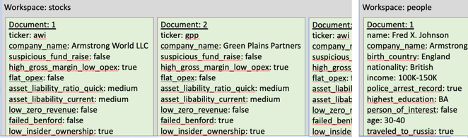
Multiple entity types can exist inside a single ADE workspace or be distributed across multiple workspaces. A solution engineer can decide when designing the ADE data schema balanced with the expected query scope.
Introduction to Aixi Discovery Engine (ADE)
Uses of ADE
Data is organized into documents of category-value pairs (also called tuples) related to an entity being queried. An entity might be a customer, account, business, or other object that has known properties and possible classifications about it. Given one document, ADE readily finds other documents like it. Given a group of documents, ADE finds a signature that defines their similarity to each other. Given a signature, ADE can create a rank ordered list of most similar documents. Groups of similar documents can be classified by adding classification properties dynamically. Given a new document, ADE can readily classify it and explain why.
Multiple entity types may exist inside a single ADE workspace or they may be distributed across multiple workspaces. That is a choice made by the solution engineer when designing the data ingest schema balanced with the expected query scope.
Each tuple (category-value pair) in a document provides a type of information about the document:
Metadata – information an external application uses, such as ids, keywords, identifiers
Observations – characteristics of the entity being documented; breakdown its description in detail
Classification(s) – conclusion(s) about the entity being documented, e.g. type:good or type:bad
Other – Many times we load data into ADE and it turns out not to be useful; ADE ignores tuples that don’t create connections between documents – it is other data
Using ADE
The ADE software is accessed via a REST API front end. Your client application queries ADE via the REST API (see p. 43). For Python developers, ADE comes with a ADEClientAPI.py module that greatly simplifies communication with ADE by handling all the REST API mechanics itself (see p. 44).
To use the REST API, your client application requires an access token. Your ADE Admin will provide you with your access token. Your access token is specific to your ADE software, your user id (which the ADE Admin maintains), and may have an expiration date. For Python, the token is either provided when first connecting to ADE (since ADEClientAPI.py remembers it) or as the ADE_TOKEN environment variable or it can be stored in $HOME/.ade.tok. When directly using the REST API, the token must be provided with every call in the ADE-Token HTTP header.
ADE produces fast results, so it can be used by Javascript from a user’s browser or called as needed from a client application.
Hardware Requirements
ADE is designed to receive client requests on the ADE REST API server which sends the requests to one or more ADE nodes. The needed number of workers and power of each server depends upon your application; for small applications, ADE can run on a single server; for huge applications, ADE can run across thousands of servers; for most applications, ADE works well using 5 to 17 servers (one REST server and 4 to 16 nodes).
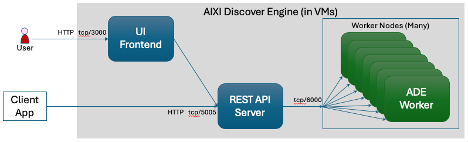
ADE can be installed on bare metal servers, they can run in Docker, and they can run in Kubernetes. For Kubernetes, it is ideal to have one ADE node image per pod dedicated to one single server. Each ADE node runs multiple ADE workers; matching the number of CPU cores to the number of ADE workers produces the best performance.
Workspaces
A Workspace is a named place where a dataset of documents can exist in isolation for purposes of analysis. A workspace contains whatever data you have for your dataset. This dataset is not a relational database or hierarchically structured data such as JSON; you can organize your data into as many or as few category-value pairs per document as desired. A solution engineer typically designs a dataset to have similar categories but thoughtfully different values within those categories in each document so ADE can produce significant results.
The data in the documents may be structured, unstructured, or a combination of both. Written English text processed by NLP can be fed as a CVP document. Data fields from a structured database can be fed as a CVP document. Multiple written documents and database records can be combined to create a CVP document. Any data can be consumed; there is no restriction.
A search is performed within a workspace, not across multiple workspaces. Documents are expected to have some degree of similarity within a workspace, making a search reasonable. Documents are not expected to have any similarity with other workspaces. However, separate workspaces with similar documents may be useful for analyzing datasets from various discrete time periods.
A workspace is created when the first document in that named workspace is created. A workspace has no explicitly defined schema for its categories and values.
The number of documents allowed within a workspace is only limited by system resources.
Documents
A document contains a collection of any amount of tuples (category-value pairs).
The special category text may only be used once per document. It contains document source information (such as original text before NLP). It is stored by ADE, but not analyzed or compared to other documents.
Each document has a unique integer id (doc_id or document id) as assigned by the client app. The document id is used by ADE to determine where to store each document; each document is assigned to a specific worker; by evenly and predictably distributing documents among workers, ADE handles large number of documents quickly and easily.
Two documents may have one or more tuples identical. This is actually desired; this can be how the two documents are similar. The more tuples that two documents share, the stronger the affinity they may have to each other. Or, stated differently, their Mutual Information (MI) is larger. When two or more have a subset of identical tuples, that subset might be used to create a signature to find more similar documents.
Document similarity is measured by how much they match. That calculated amount is the distance between them. ADE uses Normalized Kolmogorov Similarity, which is also called Google Normalized Distance.
Add meaningful tuples to your documents. Process your raw data to generate additional tuples that augment your data for best results. For example, a date may be too precise, so calculate the years (or weeks or days) from that date to another significant date; for example, add a tuple with a person’s age in addition to their birthdate because when comparing people, it is typically their age that ties similarity rather than their birthdate. Further, a number may be too precise, so you may want to create ranges, such as age:13-19 or age:teenager. For data that spans time, process the data to extract metadata or trend information; this can be very useful for finding similarity.
Create as many tuples in each document as desired. Some documents may have many tuples; some documents may have just a few. Until you have determined which tuple categories have the strongest signal (contribute toward similarity), it is better to have more than less.
Different tuples may be leveraged differently by ADE within a document. Some tuples may be properties or observations within the document; those tuples typically contribute to formulate the signatures that are used to find additional similar documents, for example eyes:blue or age:13-19 or zipcode:12345. Some tuples may be outcomes or classifications that can provide insights into new documents that are not yet classified, such as risk_of_cancer:high or risk_of_default:low or risk_of_fraud:moderate. Some tuples may be unique with no overlap with other documents; these tuples may be metadata that the application uses once the document is found, for example ssn:123-56-7890 or plp_db_id:1234567 or user_id:1502. Lastly, some tuples may simply not be used by ADE, which you will discover in time; these tuples are extra, other tuples; they do not harm or help ADE; they just exist in place; in time, they may be removed if desired; for example, moon_phase:full or favorite_color:red or apartment_no:204.

Tuples
A tuple is deceptively simple: it is a pairing of a category with a value. Both the category and value are processed textually; numbers are not understood in relation to each other; to ADE, 2.0 is not the same as 2 (they are textually different). A tuple does not exist by itself; it exists within a document.
Two identical tuples within a document are reduced to one unique tuple. Tuples with the same category but different values coexist within a document without reduction.
When working with numerical values, it is most useful to map the numerical value into a text value that can be compared. This can be done through binning by replacing the value with a range, such as 13.26 can be replaced with the range 10-15. Bin ranges depend upon the nature of the number, so they vary by category. Alternatively, a number may be mapped to a label, such as high.
A category is lower case by convention. ADE is case sensitive, so Age and age are different. A category does not have any spaces in it by convention; use underscores for gaps between words, e.g. risk_factor.
These are predefined categories; do not use them except as intended:
| Category | Description |
| text | Source information (such as original text before NLP). It is stored by ADE, but not analyzed or compared to other documents. |
| doc_id | Unique document integer id. This is specified by the client app. |
| user_labels | This category is used by the ADE API to attach an ad hoc label to a document. You can pre-populate user labels or let the ADE API manage them. |
| time | Reserved for future use. |
Create one or more classification categories. A useful application of ADE is to compare a new document to your existing documents to determine how to classify the new document.
An application may choose to attach a label to a document to mark that document. Perhaps later, that specific user label could be used to create a signature. Regardless, a user label is an ad hoc classification tuple. Inside ADE, the category user_labels is used for ad hoc document labelling.
Signatures
A signature is a series of weighted tuples used to search for documents. Each weighted tuple consists of a distance score and the tuple’s category:value.
ADE creates a named signature from a group of documents. The group may be specified as a list of document ids or they are found because they all have a common tuple (e.g. the same classification tuple such as risk:high).
Use a signature to find similar documents. Perhaps you create a signature from a subset of known similar documents, for example you know three companies (where each company is a document) are known to engage in fraudulent activity; create a signature from those three companies/documents, then perform a search on the resulting signature to find more companies that could possibly also engage in fraudulent activity. The result of a signature search is a rank ordered list of documents with the most similar document listed first down to the least similar.
When creating a named signature, you may specify a list of categories to exclude when comparing documents or provide a list of specific categories to only compare between the documents.
Data Pipeline
To use ADE, you will find yourself gathering data sources, merging them, adjusting them to align with each other, enriching them (and more) as you prepare for and eventually load your data into ADE. This is a process that data engineers call ETL – Extract, Transform, and Load. The path that you layout for your data to travel from its source to ADE is your data pipeline. Creating your data pipeline can take awhile; good data yields good results; better data yields better results.
As you assemble your data pipeline (creating your ETL scripts/programs), you have options:
- Create your own scripts/programs that prepare the data and then transmit it to ADE via the REST API or via the Python module ADEClientAPI
- Use tools provided by ADE to extract (cvpextract), transform (cvpxform), and load (cvpload) your data
- Use the Aixi Data Pipeline server by uploading your source files to it, extracting CVP documents out of them, transforming them, and finally loading the data into ADE
There is no right or wrong way here; you may even choose to do a combination of options. If you are manipulating highly sensitive data that must not be viewed by the data engineering team, then option 3 may work well.
Introduction to Aixi Discovery Engine (ADE)
Overview
ADE uses concepts from the Cognitive Reasoning discipline of Artificial Intelligence (AI). It has distinct advantages over machine learning, including explainability, sensitivity, adaptability, and data agnosticism.
The explainability feature is very important to understand why ADE produced the conclusion it did. For any result, ADE can reference back to source input. It provides:
- important for reporting RRC
- provides deterministic and repeatable calculations
- fully explainable results
- human readable
ADE remembers all its input data; it does not statistically reduce it. This enables sensitivity to detect and classify entities, detect and rank subtle correlations, and cast a wide net for high recall.
ADE has a fast learning rate, so few samples are needed before it can produce results with consistent precision. This is critical for finding subtle and new trends in data. ADE adapts to the data it ingests, allowing for quick results for various and new user queries.
ADE is agnostic to the data ingested. It will accept structured text, unstructured text, and numerics. For numerics, it is important to note that ADE does not understand numbers in a continuum, so binning or other transformation of numerical data is typically performed before ingestion.
Uses of ADE
Data is organized into documents of category-value pairs (also called tuples) related to an entity being queried. An entity might be a customer, account, business, or other object that has known properties and possible classifications about it. Given one document, ADE readily finds other documents like it. Given a group of documents, ADE finds a signature that defines their similarity to each other. Given a signature, ADE can create a rank ordered list of most similar documents. Groups of similar documents can be classified by adding classification properties dynamically. Given a new document, ADE can readily classify it and explain why.
Multiple entity types may exist inside a single ADE workspace or they may be distributed across multiple workspaces. That is a choice made by the solution engineer when designing the data ingest schema balanced with the expected query scope.
Each tuple (category-value pair) in a document provides a type of information about the document:
Metadata – information an external application uses, such as ids, keywords, identifiers
Observations – characteristics of the entity being documented; breakdown its description in detail
Classification(s) – conclusion(s) about the entity being documented, e.g. type:good or type:bad
Other – Many times we load data into ADE and it turns out not to be useful; ADE ignores tuples that don’t create connections between documents – it is other data
Using ADE
The ADE software is accessed via a REST API front end. Your client application queries ADE via the REST API (see p. 43). For Python developers, ADE comes with a ADEClientAPI.py module that greatly simplifies communication with ADE by handling all the REST API mechanics itself (see p. 44).
To use the REST API, your client application requires an access token. Your ADE Admin will provide you with your access token. Your access token is specific to your ADE software, your user id (which the ADE Admin maintains), and may have an expiration date. For Python, the token is either provided when first connecting to ADE (since ADEClientAPI.py remembers it) or as the ADE_TOKEN environment variable or it can be stored in $HOME/.ade.tok. When directly using the REST API, the token must be provided with every call in the ADE-Token HTTP header.
ADE produces fast results, so it can be used by Javascript from a user’s browser or called as needed from a client application.
Hardware Requirements
ADE is designed to receive client requests on the ADE REST API server which sends the requests to one or more ADE nodes. The needed number of workers and power of each server depends upon your application; for small applications, ADE can run on a single server; for huge applications, ADE can run across thousands of servers; for most applications, ADE works well using 5 to 17 servers (one REST server and 4 to 16 nodes).
ADE can be installed on bare metal servers, they can run in Docker, and they can run in Kubernetes. For Kubernetes, it is ideal to have one ADE node image per pod dedicated to one single server. Each ADE node runs multiple ADE workers; matching the number of CPU cores to the number of ADE workers produces the best performance.
Workspaces
A Workspace is a named place where a dataset of documents can exist in isolation for purposes of analysis. A workspace contains whatever data you have for your dataset. This dataset is not a relational database or hierarchically structured data such as JSON; you can organize your data into as many or as few category-value pairs per document as desired. A solution engineer typically designs a dataset to have similar categories but thoughtfully different values within those categories in each document so ADE can produce significant results.
The data in the documents may be structured, unstructured, or a combination of both. Written English text processed by NLP can be fed as a CVP document. Data fields from a structured database can be fed as a CVP document. Multiple written documents and database records can be combined to create a CVP document. Any data can be consumed; there is no restriction.
A search is performed within a workspace, not across multiple workspaces. Documents are expected to have some degree of similarity within a workspace, making a search reasonable. Documents are not expected to have any similarity with other workspaces. However, separate workspaces with similar documents may be useful for analyzing datasets from various discrete time periods.
A workspace is created when the first document in that named workspace is created. A workspace has no explicitly defined schema for its categories and values.
The number of documents allowed within a workspace is only limited by system resources.
Documents
A document contains a collection of any amount of tuples (category-value pairs).
The special category text may only be used once per document. It contains document source information (such as original text before NLP). It is stored by ADE, but not analyzed or compared to other documents.
Each document has a unique integer id (doc_id or document id) as assigned by the client app. The document id is used by ADE to determine where to store each document; each document is assigned to a specific worker; by evenly and predictably distributing documents among workers, ADE handles large number of documents quickly and easily.
Two documents may have one or more tuples identical. This is actually desired; this can be how the two documents are similar. The more tuples that two documents share, the stronger the affinity they may have to each other. Or, stated differently, their Mutual Information (MI) is larger. When two or more have a subset of identical tuples, that subset might be used to create a signature to find more similar documents.
Document similarity is measured by how much they match. That calculated amount is the distance between them. ADE uses Normalized Kolmogorov Similarity, which is also called Google Normalized Distance.
Add meaningful tuples to your documents. Process your raw data to generate additional tuples that augment your data for best results. For example, a date may be too precise, so calculate the years (or weeks or days) from that date to another significant date; for example, add a tuple with a person’s age in addition to their birthdate because when comparing people, it is typically their age that ties similarity rather than their birthdate. Further, a number may be too precise, so you may want to create ranges, such as age:13-19 or age:teenager. For data that spans time, process the data to extract metadata or trend information; this can be very useful for finding similarity.
Create as many tuples in each document as desired. Some documents may have many tuples; some documents may have just a few. Until you have determined which tuple categories have the strongest signal (contribute toward similarity), it is better to have more than less.
Different tuples may be leveraged differently by ADE within a document. Some tuples may be properties or observations within the document; those tuples typically contribute to formulate the signatures that are used to find additional similar documents, for example eyes:blue or age:13-19 or zipcode:12345. Some tuples may be outcomes or classifications that can provide insights into new documents that are not yet classified, such as risk_of_cancer:high or risk_of_default:low or risk_of_fraud:moderate. Some tuples may be unique with no overlap with other documents; these tuples may be metadata that the application uses once the document is found, for example ssn:123-56-7890 or plp_db_id:1234567 or user_id:1502. Lastly, some tuples may simply not be used by ADE, which you will discover in time; these tuples are extra, other tuples; they do not harm or help ADE; they just exist in place; in time, they may be removed if desired; for example, moon_phase:full or favorite_color:red or apartment_no:204.
Tuples
A tuple is deceptively simple: it is a pairing of a category with a value. Both the category and value are processed textually; numbers are not understood in relation to each other; to ADE, 2.0 is not the same as 2 (they are textually different). A tuple does not exist by itself; it exists within a document.
Two identical tuples within a document are reduced to one unique tuple. Tuples with the same category but different values coexist within a document without reduction.
When working with numerical values, it is most useful to map the numerical value into a text value that can be compared. This can be done through binning by replacing the value with a range, such as 13.26 can be replaced with the range 10-15. Bin ranges depend upon the nature of the number, so they vary by category. Alternatively, a number may be mapped to a label, such as high.
A category is lower case by convention. ADE is case sensitive, so Age and age are different. A category does not have any spaces in it by convention; use underscores for gaps between words, e.g. risk_factor.
These are predefined categories; do not use them except as intended:
| Category | Description |
| text | Source information (such as original text before NLP). It is stored by ADE, but not analyzed or compared to other documents. |
| doc_id | Unique document integer id. This is specified by the client app. |
| user_labels | This category is used by the ADE API to attach an ad hoc label to a document. You can pre-populate user labels or let the ADE API manage them. |
| time | Reserved for future use. |
Create one or more classification categories. A useful application of ADE is to compare a new document to your existing documents to determine how to classify the new document.
An application may choose to attach a label to a document to mark that document. Perhaps later, that specific user label could be used to create a signature. Regardless, a user label is an ad hoc classification tuple. Inside ADE, the category user_labels is used for ad hoc document labelling.
Signatures
A signature is a series of weighted tuples used to search for documents. Each weighted tuple consists of a distance score and the tuple’s category:value.
ADE creates a named signature from a group of documents. The group may be specified as a list of document ids or they are found because they all have a common tuple (e.g. the same classification tuple such as risk:high).
Use a signature to find similar documents. Perhaps you create a signature from a subset of known similar documents, for example you know three companies (where each company is a document) are known to engage in fraudulent activity; create a signature from those three companies/documents, then perform a search on the resulting signature to find more companies that could possibly also engage in fraudulent activity. The result of a signature search is a rank ordered list of documents with the most similar document listed first down to the least similar.
When creating a named signature, you may specify a list of categories to exclude when comparing documents or provide a list of specific categories to only compare between the documents.
Data Pipeline
To use ADE, you will find yourself gathering data sources, merging them, adjusting them to align with each other, enriching them (and more) as you prepare for and eventually load your data into ADE. This is a process that data engineers call ETL – Extract, Transform, and Load. The path that you layout for your data to travel from its source to ADE is your data pipeline. Creating your data pipeline can take awhile; good data yields good results; better data yields better results.
As you assemble your data pipeline (creating your ETL scripts/programs), you have options:
- Create your own scripts/programs that prepare the data and then transmit it to ADE via the REST API or via the Python module ADEClientAPI
- Use tools provided by ADE to extract (cvpextract), transform (cvpxform), and load (cvpload) your data
- Use the Aixi Data Pipeline server by uploading your source files to it, extracting CVP documents out of them, transforming them, and finally loading the data into ADE
There is no right or wrong way here; you may even choose to do a combination of options. If you are manipulating highly sensitive data that must not be viewed by the data engineering team, then option 3 may work well.

